As an Amazon Associate, we earn from qualifying purchases. Some links on this site are affiliate links at no extra cost to you. Our recommendations are based on thorough research and editorial judgment.


How to Record Your Piano Practice for Self Evaluation

Are you looking to elevate your piano skills? Recording your piano practice is an incredibly effective method for self-evaluation!
You may be interested
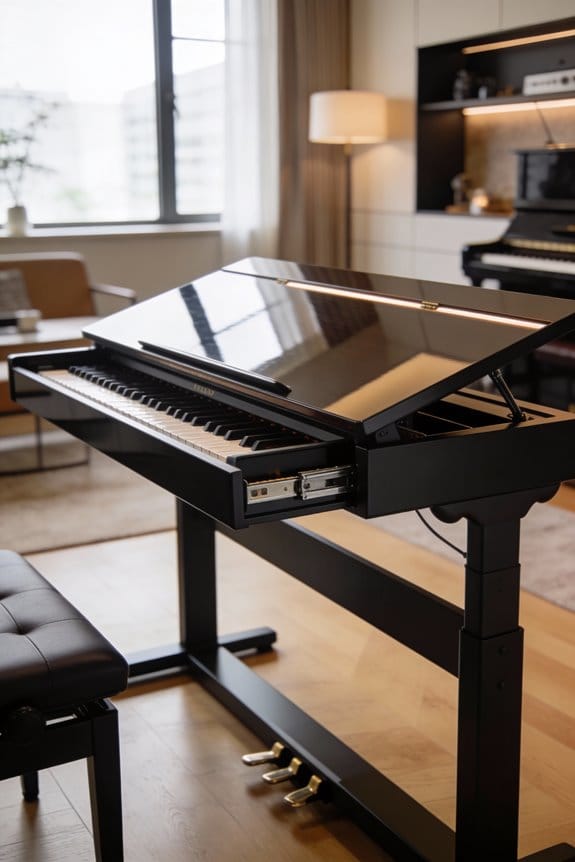


Suitable for pianists of all levels, from beginners to advanced players, this technique allows you to closely analyze your performance. By setting up a mobile phone or camera a few feet away—ideally with an external microphone—you can capture both the visual and audio aspects of your playing in a quiet and well-lit environment.
Once you hit record, you’ll have a valuable resource to review later. Get ready to listen for mistakes and identify areas where you can improve.
Want to dive deeper into editing your recordings or discovering advanced techniques for self-analysis?
Key Takeaways
- Use a mobile phone or DSLR camera, positioning it 3-5 feet away for balanced audio-visual capture.
- Incorporate an external microphone to enhance audio quality and detail during recordings.
- Choose a quiet space with good lighting to minimize distractions and improve video clarity.
- Regularly listen to your recordings to evaluate technique, identify improvements, and track progress over time.
- Experiment with different recording angles and microphone placements to find the most effective setup for your performance.
Importance of Recording for Self-Assessment

Hey there! Have you ever thought about how recording your piano practice can really boost your skills? It’s a simple technique that gives you both auditory and visual feedback, which is super helpful for self-assessment. Just picture this: after playing a piece, you can listen back and catch all those missed notes, or even watch how your hands move on video. It’s like having your own personal coach right there with you!
When you go back and watch your recordings, you can easily spot a few things that might need improvement. For example, are your fingers moving smoothly across the keys, or do they seem a bit clunky? And how about the emotions you’re trying to convey—do you think your playing captures that feeling? Hitting play on your recordings can lead to some “aha” moments, helping you sharpen your technique and play more expressively.
Getting into the habit of recording isn’t just for beginners, either. Even experienced players can gain insights by reviewing their performances. So why not grab your phone or any recording device and start documenting your practice sessions? It’s a great way to reflect on your progress. Who knows—you might discover something new about your playing that takes you to the next level! Using over-ear headphones during playback can also enhance your ability to identify subtle nuances in your performance.
Getting Started With the Right Equipment

Getting started with your piano recording setup can be a lot simpler than you might think! When it comes to capturing your performance, you don’t need to stress over fancy equipment right away. Your mobile phone can actually do a great job for recording video, but if you want to step it up, consider getting a DSLR camera—like a Canon or Nikon. Just remember to grab a tripod to keep everything nice and steady!
Now let’s talk about picking the right microphone for your audio. Most built-in mics, like the ones on laptops or phones, don’t really capture the full richness of piano music. If you want clearer sound, try using an external mic. For example, the Rode VideoMic Pro can pick up every note beautifully, making your performance shine.
Also, don’t forget about camera angles! Positioning your camera a few feet away can give viewers a better view of your finger work and body language while you play. Plus, it’s a great way to notice any habits or quirks in your performance that you might want to improve on. So once you’ve got all of this sorted, you’ll be ready to dive into recording your music! Let’s explore how to fine-tune your performance next. 🎹✨ Proper piano maintenance tools can also help ensure your instrument sounds its best when you record.
Recommended Products

Adjustable Height & Solid: The height of the microphone stand with boom arm is adjustable from 28.1 inches to 89.8 inches by adjusting the knobs, perfect for people in all age groups. It features upgraded supporting structures for better load-bearing capacity, holding your microphone in position.

Great for professional vocal/acoustic recording and podcasting.
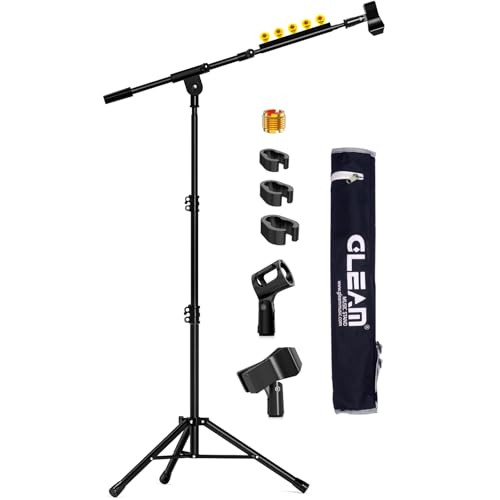
【ADJUSTABLE HEIGHT FOR ALL AGES & STURDY BUILD】 Easily adjust the microphone stand's height from 21" to 69" with secure locking knobs, making it perfect for children, adults, and performers of any size. Its reinforced supporting structure provides superior load-bearing capacity, keeping your microphone firmly in place without slipping or shaking.
Setting Up Your Recording Environment

If you want to capture your piano performance in the best way possible, creating an inviting and effective recording environment is key! Start by placing your recording device about 3-5 feet away from the piano. This distance is perfect because it balances the audio and visual aspects, giving a clear view of your playing while still capturing that beautiful sound.
Now, let’s talk about lighting. Good lighting is crucial! You want your performance to shine without any dark shadows creeping in. If you can, set up near a window for natural light or use soft, bright lamps to create an even glow in your space.
And don’t forget about background noise—this can be a real deal-breaker. Try to find a quiet room where distractions like barking dogs or vacuum cleaners won’t interrupt your take. For instance, if your family tends to be noisy during the day, recording in the early morning or late evening might be a great solution.
Also, make sure to use a stable tripod for your camera. Shaky footage can ruin an otherwise great performance. Before you start recording, check that all the parts of the tripod are tightened. Experiment with different angles to figure out which perspective showcases your playing best. So, are you ready to set up your space? Let’s move on to other essential tips for recording!
Remember, just as selecting the right guitar body shape enhances playability and tone in guitar practice, optimizing your recording setup similarly improves your piano practice evaluation.
Recommended Products

Camera mount tripod stand with zippered storage bag
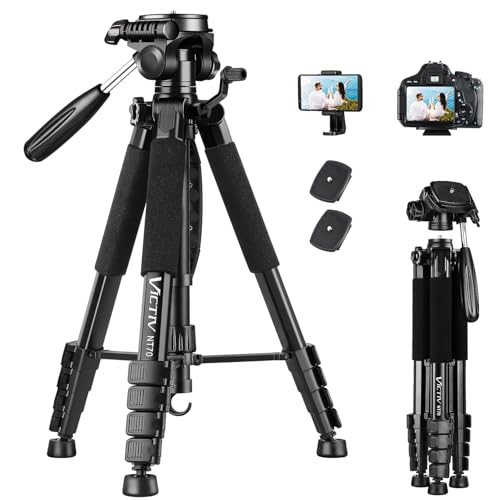
【74 Inch Tall Tripod and Compact Tripod】 This tall camera tripod has a height adjustment range of 19-74 inches. It can meet the needs of daily work. This compact tripod comes with a carrying bag for outdoor and indoor shooting. This compact tripod weighs 3.14 lbs / 1.4 kg and is easy to store and stow

Superior Mini Tripod: Made of high-quality ABS material, the mini tripod is comfortable to hold and durable to use. non-slip silicone pad at the bottom to increase friction, preventing the tripod from sliding, this tripod offers maximum stability for your devices and helps you to take stunning photos from anywhere
Tips for Capturing High-Quality Audio
Hey there! If you want to really take your piano performance to the next level, capturing high-quality audio is a must. Trust me, using an external microphone, like the Rode VideoMic Pro, can transform your recording. Those built-in mics? They just aren’t going to cut it!
Positioning your mic close to the piano is key to picking up those gorgeous notes. If you want to keep the sound crisp, make sure to record in a quiet space to avoid any distracting background noise. For instance, I once recorded a piece in my living room, then tried again in a much quieter room, and the difference was night and day!
Using a digital audio workstation, or DAW, is another great way to improve your recordings. Just remember to set the resolution high so you get that sharp sound you’re aiming for. Playing around with different mic placements and adjusting the recording levels can make a big impact, too. It’s all about discovering what showcases your unique playing style best.
Additionally, if your digital piano supports 128-note polyphony, taking advantage of this can prevent note dropout and ensure your recording captures every detail of complex pieces.
Recommended Products
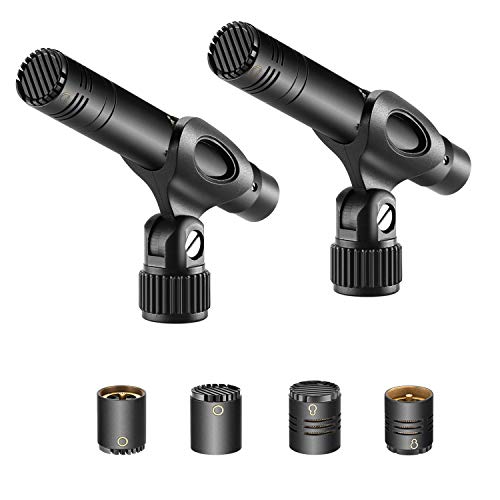
INTERCHANGEABLE CAPSULES THREE DIRECTIOANS: Includes cardioid, omni and super capsules for use in virtually most recording situation. You can get the sound you want, whether its subtle nuances of a studio recording or the dynamic sparkle of a live orchestra. Easy to mount and remove

Media Condition: Near Mint (NM or M-)

[Authentic Sound Integrity] Experience natural sound reproduction with the podcast microphone with boom arm to preserve the audio sound without distortion. The XLR dynamic microphone boasts a SPL of 130dB, delivering original and consistent recordings. Cardioid pattern reduces ambient noise, ensuring your voice takes center stage, free from distracting background sounds. (For better input volume, record within 2'' to 6'' from the dynamic microphone. )
The Editing Process for Your Recordings
Editing your piano recordings can be an exciting journey! The key to a polished result is to keep things simple. You want your video to maintain a clear and professional look, so avoid any flashy edits that might make it feel chaotic—unless you’re going for that carnival vibe!
For visual tweaks, using multiple camera angles can really bring your performance to life. Just be careful with zooming in and out; unless you have steady hands or a good tripod, it can get a bit shaky. Programs like iMovie are great for blending your clips smoothly—just snip and adjust as needed. If you’re unsure about how to cut down your footage, try focusing on the best moments of each take.
Let’s talk about sound quality, too! Investing in an external microphone can make a world of difference in how your music comes across. It picks up a richness that your built-in mic might miss. And remember, those large HD files can be a hassle to upload. Using a compression app will make your life a lot easier for sharing. So get ready to fine-tune those recordings and make them shine! Now, let’s move on to the next steps in perfecting your sound.
For an optimal recording environment, consider using a music studio desk that can help organize your equipment and cables efficiently.
Recommended Products

Omnidirectional Microphone - It is not a Speaker or Speakerphone, it is a condenser microphone. The microphone has an omnidirectional pickup pattern with a pickup distance of 11.5 ft, making it easy to capture the most subtle sounds from 360° directions and transmit the sound more loud and clear. Participants can hear each other without raising their voices.

【Crystal Clear Audio Quality】Our Cardioid pattern condenser microphone accurately captures your voice, making it perfect for dictation, online classrooms, and more.

[Convenient Setup] Plug and play recording USB microphone for PC, with 5.9-Foot USB cable included for computer PC laptop, is connected directly to USB-A port for recording music, computer singing or podcast. The office condenser microphone for computer is easy to use and install. (NOT compatible with Xbox and Phones)
Analyzing Your Recordings for Improvement
Hey there! Have you ever thought about how analyzing your recordings can actually feel like opening a gift? It’s pretty cool because each time you listen, you find those little details that could make your piano playing even better. For instance, when you pay attention to subtle performance nuances, you might notice a phrase that just sparkles or a section where you can really bring out the emotion.
And speaking of details, let’s talk about technique alignment. Watching a video of yourself can reveal things you didn’t even realize you were doing. Maybe you notice your wrist is a bit rigid when you play fast passages, which can totally mess with your flow. It’s like realizing your hands have their own quirky dance moves—definitely an eye-opener!
Listening back also sharpens your musical ear. Do you remember that moment when the rhythm felt a bit off? Instead of brushing it aside, take a moment to identify what happened. Maybe there was a note that wasn’t quite in sync or a tempo change that surprised you. Reflecting on these moments not only helps improve your technique but also builds your confidence for future performances.
Additionally, maintaining your instrument with key leveling tools is essential to ensure the best possible sound quality during practice and recording.
Embracing the Benefits of Regular Recording
You know, recording your piano practice can really open up some amazing opportunities! When you hit that record button, you get to hear and see yourself play. It’s like having a mirror for your music. Imagine being able to listen to how you really sound or watch your fingers dancing across the keys—pretty cool, right?
This habit not only helps you assess your skills but also ignites your creativity. For example, when you record a piece and listen to it later, you might notice spots where you could add a bit more emotion or try a different tempo. It’s a great way to refine your style before sharing with a teacher or friends. Plus, it’s often surprising to spot those quirky hand movements you didn’t realize you had!
Additionally, regular self-evaluation through recording can help identify key weight issues, which are essential to address for improving playing comfort and performance quality.
Frequently Asked Questions
How to Record Piano Practice?
Q: How can I effectively record my piano practice?
A: Use high-quality audio equipment and advanced recording software to capture your sound clearly. This setup allows you to listen critically to your playing and track improvements over time.
*Tip: Consider using a microphone positioned close to the piano for the best sound quality.*
Q: Why is it important to review practice recordings?
A: Reviewing your recordings helps identify strengths and weaknesses in your playing, which guides your practice focus. It encourages self-assessment and accountability in your musical journey.
*Caveat: Make sure to be objective when listening to your recordings; focus on areas for improvement rather than just what’s pleasing to hear.*
What Is the 80 20 Rule in Piano?
Q: What does the 80/20 rule in piano mean?
A: The 80/20 rule suggests that 80% of your improvement comes from just 20% of your focused practice. Concentrating on key techniques and challenging pieces can significantly enhance your playing.
*Tip: Identify the most effective techniques or pieces that yield the greatest improvement for your playing.*
Q: How can I apply the 80/20 rule to my piano practice?
A: To apply this rule, focus your practice sessions on the essential techniques and difficult pieces that will contribute most to your progress. This targeted approach makes your practice more efficient.
*Caveat: Avoid neglecting other areas of improvement; balance is important for overall growth as a musician.*
Q: Why is mindful playing important in relation to the 80/20 rule?
A: Mindful playing allows you to concentrate on improving specific aspects of your technique, which aligns with the 80/20 principle. This intentional focus can lead to more significant advancements in your skills.
*Tip: Set specific goals for each practice session to enhance mindfulness and achieve better results.*
How to Track Piano Progress?
Q: How can I track my piano progress?
A: To effectively track piano progress, establish clear progress markers and set specific goals. This will help you measure your advancement and recognize improvements over time.
*Tip: Keep a practice journal to document your achievements and challenges for a clearer picture of your progress.*
Q: Why is goal setting important for piano progress?
A: Goal setting is essential as it provides direction and motivation in your practice. By creating tangible milestones, you can focus your efforts and see how far you’ve come.
*Caveat: Ensure your goals are realistic and achievable to avoid frustration and maintain motivation.*
Q: How do consistent practice habits contribute to progress?
A: Consistent practice habits enhance your focus and help solidify techniques and skills. This regular engagement allows you to recognize improvements more easily over time.
*Tip: Schedule specific practice times each week to build a routine that promotes consistency.*
How Do You Record a Piano?
Q: How do I position a microphone for recording a piano?
A: To capture the best sound from a piano, place the microphone about 6 to 12 inches away from the strings, ideally around the damper pedal for a balanced tone. Experiment with angles to find the sweet spot for your specific piano. Tip: Use a cardioid or condenser microphone for a clearer and more nuanced recording.
Q: What recording apps can I use for piano recording?
A: There are several user-friendly recording apps available, such as GarageBand and Ableton Live, that provide easy interfaces for capturing piano performances. Look for features like multi-track recording and built-in effects for added creativity. Caveat: Always ensure your app settings match your audio interface for optimal sound quality.
Q: How do I connect an audio interface for enhanced recording quality?
A: Connect your piano to an audio interface via either MIDI or direct inputs, which helps in converting analog signals to digital formats for better sound clarity. This setup can significantly reduce latency and improve overall audio quality. Tip: Make sure your interface is compatible with your recording software to avoid connectivity issues.


